

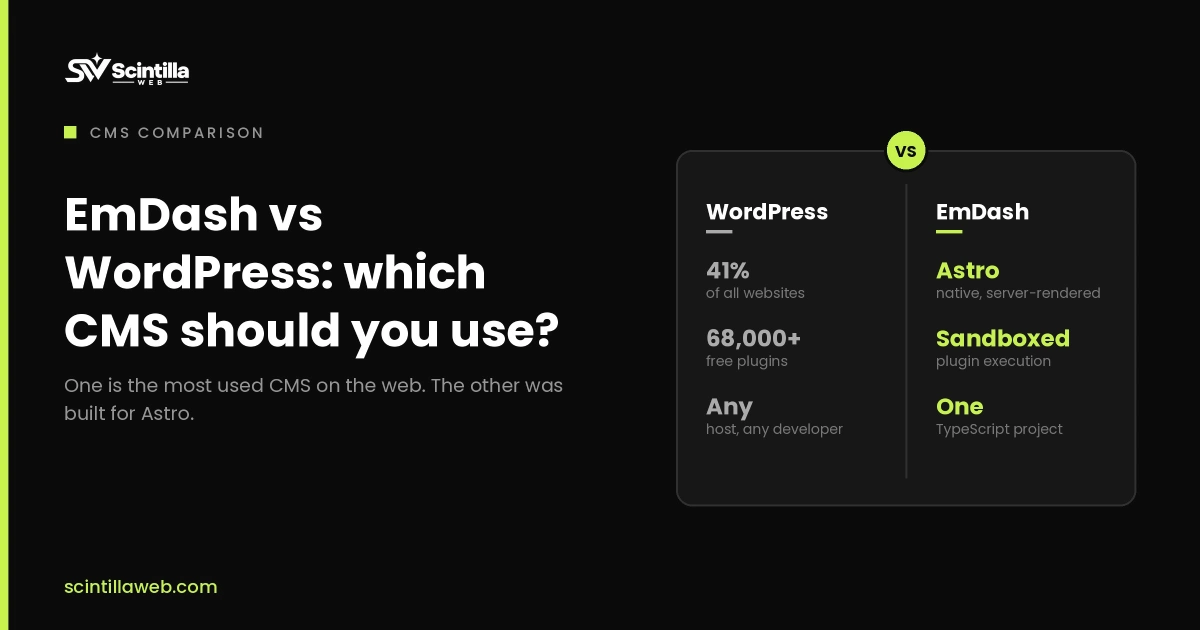
You’ve run your blog on WordPress for years. It works. But every week brings another plugin update, another security alert, and another “is my site slow?” moment. Then Cloudflare launched a new CMS and called it the spiritual successor to WordPress.
So here’s the real question: EmDash vs WordPress, which one makes sense for your site right now? I tested the EmDash playground, clicked through every menu, and compared it with the WordPress sites I build every week. This guide covers how each one works, where EmDash wins, where WordPress still wins, and who should switch.
Key takeaways
- EmDash is a free, open-source CMS from Cloudflare. It’s built with TypeScript and Astro and runs serverless.
- Its biggest edge is plugin security. Each plugin runs in its own sandbox and only gets the access you approve.
- WordPress still wins on themes, plugins, page builders, and ease of use for non-technical site owners.
What Is EmDash?
Quick answer: EmDash is a free, open-source content management system made by Cloudflare. It’s written in TypeScript, built on the Astro framework, and runs on serverless Cloudflare Workers or Node.js. Its main selling point is sandboxed plugins that can’t touch your data unless you allow it.
Cloudflare first showed EmDash on April 1, 2026. Plenty of people thought it was an April Fools’ joke. It wasn’t the stable EmDash 1.0 release followed on September 28, 2026.
The name is a little joke too. “Em dash” was the punctuation mark everyone blamed on AI writing. Here, it’s a serious project with more than 175 contributors and 1,800 commits, according to CMSWire.
It’s MIT-licensed and uses no WordPress code. That matters, and we’ll come back to it in the plugin section.
EmDash vs WordPress at a Glance
Here’s the short version before we go deeper.
| Language | TypeScript (Astro) | PHP |
| Hosting | Serverless (Cloudflare Workers or Node.js) | Always-on server |
| Plugin security | Sandboxed, permission based | Full access to files and database |
| Plugin library | Under 100 plugins (Oct 2026) | 70,000+ free plugins |
| Themes | Astro code themes | Thousands, plus page builders |
| License | MIT | GPL v2 |
| AI agent support | Built-in MCP server, CLI, API | Through plugins |
| Best for | Developers, lean content sites | Most site owners, stores, teams |
| Age | New in 2026 | About 23 years old |
The table tells a clear story. EmDash has the cleaner, safer design. WordPress has the huge ecosystem.
A Quick Tour of the EmDash Dashboard
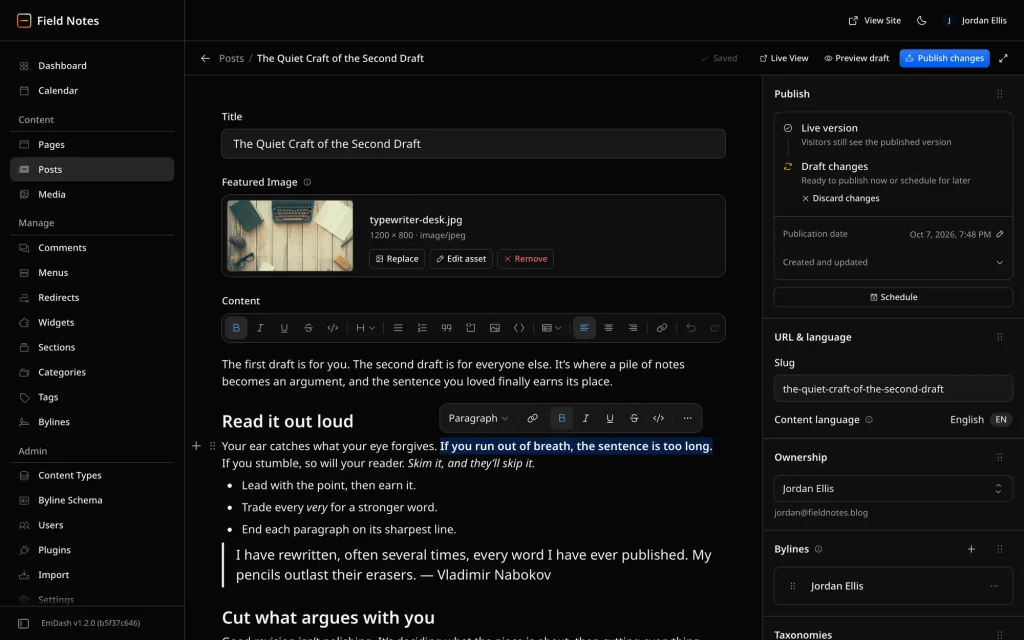
When I opened the playground at emdashcms.com, the first thing I noticed was how familiar it felt. If you’ve used WordPress, you’ll find your way around in minutes. But it’s cleaner, and it’s fast. Pages load the moment you click.
The left menu is split into simple groups:
- Content: pages, posts, and media
- Manage: comments, menus, redirects, widgets, sections, categories, tags, and bylines.
- Admin: content types, users, plugins, import, and settings
A few small things stood out. You can duplicate a page with one click. WordPress still needs a plugin for that after all these years. Redirects are built in too, so you don’t need an extra plugin for basic SEO cleanup.
The editor feels a bit like Gutenberg. You get a plain text editor in the middle, and your categories, SEO fields, featured image, and revisions on the right. There’s a full-screen mode for writing without distractions.
Sections work like reusable blocks. Think of a header, an “about the author” box, or a sign-up form you can place on many pages. You can also create custom content types, such as “Projects”, right from the admin. In WordPress, you’d usually need code or a plugin like ACF.
There’s also a front-end editor. Open any blog post, click edit, and type right on the page. Click edit again, and it saves.
How EmDash Works: Serverless and V8 Isolates
This is where the two platforms split apart.
WordPress runs on PHP. It needs a server that’s always on and always waiting for visitors. That server uses power and costs money even at 3 a.m. when nobody is reading your blog.
EmDash is serverless. It uses something called V8 isolates. When someone visits your site, a tiny isolated space starts up in milliseconds. It serves the page, then goes away. If you get a traffic spike, it scales up right away. When traffic stops, it scales back to zero.
What does that mean for you?
- You pay for what you use – no paying for an idle server.
- Traffic spikes don’t crash your site. Cloudflare’s own blog runs on EmDash and handles up to 5,000 requests per second.
- No cold start delays. Isolates start inside an existing runtime, so they don’t need a new virtual machine each time.
Plugin Security: The Real Difference
Here’s the thing. Plugins are the best part of WordPress. They’re also its biggest weak spot.
In WordPress, a plugin is just a PHP script. When you install one, you hand it the master key to your house. It can read your whole database and every file. If a simple contact form plugin has a bug, a hacker can use it to reach everything.
The numbers back this up. Patchstack’s security report found almost 8,000 new WordPress vulnerabilities in 2024. About 96% came from plugins. Only seven were in WordPress core.
EmDash takes a different path. Every plugin runs in its own sandbox, called a Dynamic Worker. The plugin is blind by default. It can’t see your database, your files, or the internet unless you say yes.
Each plugin must list what it needs in a manifest. For example, an email plugin might ask to “read content” and “send email.” That’s all it gets. It works like the permission pop-ups on your phone.
EmDash 1.0 also added a plugin registry where developers sign their releases. Before installation, EmDash checks that the plugin matches what the author published.
Pro tip: On new EmDash projects, the sandbox may be off by default. On Cloudflare, sandboxed plugins need the Workers Paid plan, which starts at $5 a month. Check this before you install anything.
There’s a money angle for developers too. WordPress plugins are tied to the GPL license, which pushes many authors to give code away and charge only for “pro” features. EmDash plugins don’t share code with the core, so authors can pick any license they want.
Need help keeping a WordPress site safe while you decide? See our WordPress development and maintenance services.
Themes, SEO, and Site Speed
In WordPress, themes can carry risk through the functions.php file. A theme can run code that touches your database.
EmDash themes are built with Astro, a fast framework made for content sites. Cloudflare bought the Astro team earlier in 2026. An EmDash theme can never run database actions. It only handles the front end, so your data stays safe.
For SEO, this is good news:
- Astro sends plain HTML with very little JavaScript.
- Pages load fast, which helps Core Web Vitals
- Search engines and AI crawlers can read your content without running scripts.
That last point matters more than most people think. Many AI tools like ChatGPT and Perplexity read raw HTML only. If your content needs JavaScript to show up, they may not see it at all.
EmDash also stores content in separate pieces. The title, body, and images each have their own spot. AI tools can pull one part without reading the whole page.
The catch? There’s no page builder. If you love Elementor or Divi, EmDash will feel bare. You’ll need a developer to build or change your theme. If you want a fast Astro site built for you, our Astro development team can help.
AI Agents, MCP, and Pay-Per-Use Content
WordPress is adding AI features now. EmDash had them from day one.
It comes with a built-in MCP server. MCP is a standard way for AI tools to talk to apps. You can point an AI coding agent at your site and say, “Create a new content type for recipes.” The agent has the tools to do it.
On WordPress, you can get MCP access too. But it usually comes from a third-party plugin, which adds another layer of security.
EmDash also supports x402 payments, based on the old HTTP 402 “payment required” code. It lets you charge AI agents or readers small amounts per visit. No subscription plugin needed. It’s early, but it’s a new way to earn from your content.
Can You Migrate From WordPress to EmDash?
Yes, but with limits.
EmDash has an import tool in the admin. You can bring in pages, posts, and custom post types from WordPress. One early user moved a small WordPress microsite in less than a day.
Here’s what moves well and what doesn’t:
- Moves well: posts, pages, categories, tags, media, and most text
- Needs rebuilding: your theme, plugins, shortcodes, and page builder layouts
- Not ready yet: WooCommerce stores. There’s no full replacement today.
My worry is design. If your site was built with Elementor or Divi, the content may come across, but the look won’t. EmDash also uses a format called Portable Text instead of HTML for content, which changes how some blocks are stored.
Will switching hurt your SEO? Not if you keep your URLs, set up redirects, and keep your content quality high. Google ranks helpful pages, not a CMS brand.
Which CMS Should You Choose?
Let’s be honest. For most bloggers and small business owners today, WordPress is still the safer pick. It has more plugins, more themes, easy hosting, and a huge support community.
Choose WordPress if you:
- Run an online store with WooCommerce.
- Use a page builder like Elementor or Divi.
- Work with a team that needs simple editing and approvals.
- Don’t have a developer on hand.
Choose EmDash if you:
- Run a lean blog or content site and want top speed.
- Care a lot about plugin security.
- Have a developer, or you’re comfortable with code.
- Want AI agents to help manage your content
Matt Mullenweg, co-founder of WordPress, argued that EmDash mainly helps sell Cloudflare services, since its full sandbox works best on Workers. That’s a fair point to weigh. Meanwhile, Yoast SEO founder Joost de Valk called it one of the most interesting things to happen to content management in years, and he’s building for it.
Common Mistakes to Avoid
Switching a live business site too fast. EmDash 1.0 is stable, but the ecosystem is small. Test it on a side project first.
Expecting your page builder design to import. Content moves. Layouts don’t. Plan for a theme rebuild.
Assuming EmDash plugins are safe by default. Check that sandboxing is turned on, and read every permission a plugin asks for.
Forgetting redirects. If your URLs change, set up 301 redirects. Skipping this is the fastest way to lose rankings.
Ignoring WordPress updates while you wait. If you stay on WordPress for now, keep plugins updated and delete the ones you don’t use.
Frequently Asked Questions
Is EmDash better than WordPress?
EmDash has a safer plugin design and faster pages. WordPress has a bigger ecosystem and is easier for non-developers.
Is EmDash free?
Yes. EmDash is free and MIT-licensed. You only pay for hosting, such as Cloudflare Workers.
Can EmDash replace WordPress?
Not for most sites yet. It’s a strong WordPress alternative for lean content sites run by developers.
Does EmDash only work on Cloudflare?
No. It also runs on Node.js. Cloudflare Workers is the best-supported option, though.
How do I migrate from WordPress to EmDash?
Use the built-in import tool for posts and pages. Then rebuild your theme and replace plugins.
Is EmDash good for SEO?
Yes. Astro sends clean HTML that loads fast, which helps Google and AI search tools read your pages.
Does EmDash have a page builder?
No. Themes are built in code with Astro. There’s no Elementor or Divi-style builder yet.
Does EmDash support WooCommerce?
No. There’s no direct WooCommerce replacement, so online stores should stay on WordPress for now.
Why are WordPress plugins a security risk?
WordPress plugins get full access to your files and database. One buggy plugin can expose your whole site.
Who made EmDash?
Cloudflare built EmDash and released version 1.0 in September 2026. It’s open source on GitHub.
Conclusion
So, EmDash vs WordPress: who wins? It depends on you.
EmDash fixes the biggest problem WordPress has, which is plugin security. It’s fast, serverless, and ready for AI agents. WordPress still leads on plugins, themes, stores, and ease of use.
If you’re a blogger with a simple site and a developer to help, EmDash is worth a test run now. If you rely on WooCommerce, page builders, or a big team, stay on WordPress and keep an eye on EmDash as it grows.
Either way, you don’t have to decide alone. Whether you want a fast new Astro site or a cleaner, safer WordPress build, talk to the ScintillaWeb team, and we’ll help you pick the right path.