

Astro Development Agency
We build content-driven sites on Astro, develop our own Astro themes, and work with EmDash CMS - the Astro-native CMS - so your editors get a real admin without giving up the performance.
Most marketing sites ship an application to render an article
Open the bundle analyser on a typical React or Next.js marketing site and look at how many kilobytes of JavaScript are being downloaded, parsed and executed to display what is essentially text and images.
Astro inverts that. Pages render to HTML at build time and JavaScript is sent only for the components you explicitly mark as interactive. The rest of the page costs nothing to hydrate, because it never hydrates.
Nothing on the page looks wrong. The cost shows up in time-to-interactive on a mid-range phone, which is where most of your traffic actually is.
React, Vue, Svelte and Solid all run inside Astro. It is not a new component model to learn, it is a decision about what gets sent to the browser.
Content collections give your content a schema. A missing field breaks the build instead of the live page, which is a much cheaper place to find out.
A framework built for content, and now well funded
Astro themes built for real businesses
We create lightweight, thoughtfully designed Astro themes alongside our WordPress collection. Explore our latest releases, preview the demos, and find the right starting point for your next website.

SWP Freelancer Portfolio Astro Theme
A fast, accessible portfolio theme for freelance designers, art directors and small studios.
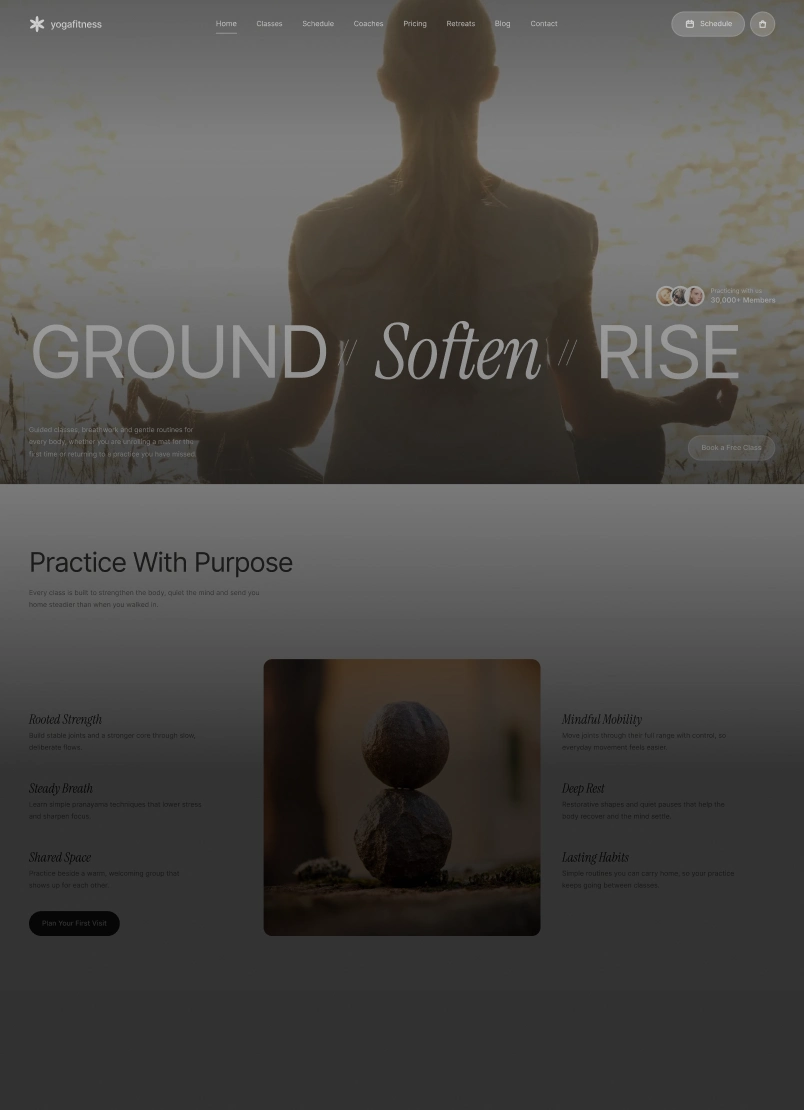
Yoga & Fitness Astro Theme
A calm, editorial theme for yoga studios, wellness coaches and mindful-movement brands.
Explore our published themes and live demos on Astro.build.
The CMS that finally makes Astro workable for clients
The usual objection to Astro is editing. A framework is excellent for developers and useless to the person who needs to change opening hours on a Friday afternoon. That normally means bolting on a headless CMS and accepting the seams.
EmDash closes that gap. It is an open-source, Astro-native CMS with a full admin - content types you define yourself, drafts, revisions, scheduling, taxonomies, menus, full-text search and live preview - built so the front end and the content layer are one TypeScript project rather than two systems held together with an API.
We build with it, and it is the reason we can now recommend Astro to clients who would previously have needed WordPress.
Extensions execute in isolated sandboxes rather than with full access to the application. That directly addresses the failure mode behind the overwhelming majority of WordPress vulnerabilities.
Server-rendered pages, content loaders and image components are first-class, so there is no adapter layer translating between CMS and framework.
Custom content types, drafts and revisions, scheduled publishing, taxonomies, menus and live preview - the things editors actually use, without a WordPress install underneath.
Content layer and front end share types. A field that changes in the CMS breaks the build rather than the live page.
Extensive APIs and MCP support mean an AI agent can read and edit the site alongside your team, which is increasingly how content work actually gets done.
Custom block types, admin pages, hooks and storage through its plugin system - so bespoke requirements do not mean abandoning the platform.
EmDash CMS is open source and developed in the open - see the documentation, the playground or the repository. Ask us on the call whether it suits your editing team; for some clients WordPress is still the right answer.
Where content sites lose their speed
- Everything hydrates, whether it needs to or not
A framework that hydrates the whole page treats a static article and an interactive pricing calculator identically. Islands let you pay only for the second one.
- Third-party scripts arrive uninvited
Analytics, chat widgets, heat maps and pixels are usually heavier than the framework everyone blames. They need auditing before any code is rewritten.
- Images are the largest thing on the page
Astro's image pipeline handles formats and sizing at build time, but only if it is actually used rather than bypassed with plain image tags.
- Content has no schema
Without typed collections, a missing description or a mistyped date becomes a broken page in production rather than a failed build in CI.
We treat performance as a budget agreed at the start, and we measure it on mid-range phones rather than a developer's laptop.
Astro makes a fast site the default. It does not make a slow one impossible, and most of what we fix was added after launch.
Static by default,
dynamic where it earns it
Audit and scope
What the current site ships, what it costs in load time, and a written scope with a fixed price and a date.
Content model
Collections and schemas defined first, so pages are composed from typed content rather than hand-built.
Build
Components, islands drawn deliberately, and a performance budget checked at every stage rather than at the end.
Deploy and hand over
Adapter chosen for your host, redirects tested, CMS training and a recorded walkthrough. Repository in your account.
We build products on the platforms we recommend
Our WordPress themes and plugins are published and maintained against every core release, and we are building an Astro catalogue the same way. Client work benefits from the same standard.
Start a project ↗Islands drawn deliberately +
Every interactive component is a decision with a cost attached. We mark what genuinely needs hydration and leave the rest as HTML.
We will tell you when Astro is wrong +
It suits content-driven sites. For a heavily interactive application, another stack is usually the better answer and we will say so on the call.
Performance treated as a budget +
A target set at the start and checked at every stage, measured on mid-range devices rather than a laptop on office wifi.
SEO built into the architecture +
URL structure, schema, sitemaps and internal linking decided during the build, because retrofitting them is more expensive and works less well.
Your editors keep their CMS +
Astro pairs with whichever headless CMS your team already knows, including WordPress. The front end changes; the editing experience does not have to.
You own everything +
Repository, hosting and domain in your accounts from day one. Astro is MIT-licensed and the adapters mean you can deploy anywhere.
Astro work we take on
From a single marketing site to a documentation platform with hundreds of typed content entries.
Custom Astro themes
Themes built on Astro's component model and content collections, with the interactive parts isolated as islands rather than hydrating the whole page.
A theme that ships JavaScript to render text is paying a tax on every page view. Astro lets you spend that budget only where something actually needs to be interactive.
Marketing and content sites
Blogs, documentation, editorial and marketing sites where content is the product and every kilobyte of JavaScript is overhead your readers pay for.
This is the category Astro was built for, and where the difference against a React-based stack is largest.
EmDash CMS builds
Sites built on EmDash, the Astro-native CMS — a full admin with content types, revisions, scheduling and live preview, sharing one TypeScript project with the front end.
It removes the usual trade-off on Astro projects: developers get the framework, editors get a real admin, and neither side inherits a plugin security problem.
Headless CMS integration
Astro as the front end with your content living in Sanity, Storyblok, Contentful, Strapi or WordPress itself, pulled at build time or on demand.
Your editors keep the interface they know. The visitors get static HTML instead of a client-side render.
Migrations to Astro
Moves from WordPress, Gatsby, Next.js or a hand-rolled static site, with every indexed URL mapped and redirected before launch.
Migrations lose rankings when redirects become a launch-day task. We map the URLs before design starts.
Performance engineering
Bundle analysis, image pipeline, font loading and island boundaries tuned against a measured budget on real devices.
Astro starts fast. It is still possible to make it slow by hydrating things that did not need it, and that is what we audit for.
E-commerce storefronts
Astro front ends over Shopify's Storefront API or a headless cart, where the catalogue needs speed more than it needs a heavy app shell.
Product and collection pages are mostly content. Rendering them as HTML and hydrating only the cart is usually the right trade.
SSR and edge deployment
Server rendering through Astro's adapters where pages genuinely need to be dynamic, deployed to Cloudflare, Netlify, Vercel or a Node host.
Static by default, dynamic where the page has a reason to be. Choosing per route rather than per project is the point.
Design systems and components
Reusable components and content schemas your team composes pages from, with types enforced so a missing field fails the build rather than the page.
Content collections catch the broken page at build time instead of on a Tuesday afternoon in production.
Astro questions, answered
Is Astro right for our site? +
If content is the main thing your site does - marketing, blog, documentation, catalogue - then usually yes. For a heavily interactive application, another stack is likely a better fit.
Can our team still edit content? +
Yes. Astro pairs with a headless CMS, including WordPress used purely as the editing layer. Your editors keep an interface they recognise.
Can you migrate us from WordPress? +
Yes, and it is one of the more common requests. Every indexed URL is mapped and redirected before launch so existing rankings survive the move.
Is Astro stable enough to commit to? +
It is MIT-licensed and the team joined Cloudflare in January 2026, which removed the main risk of an independent framework - funding. The adapter model also means you are not tied to one host.
Do you build custom themes or use existing ones? +
Custom, built on Astro's component model. We are also developing our own theme catalogue, listed above as each one ships.
What is EmDash CMS, and do we need it? +
An open-source CMS built specifically for Astro, giving your team a full admin - content types, drafts, revisions, scheduling, live preview - while the site stays an Astro project. You do not need it if your content rarely changes or you already have a headless CMS you like.
Can we still use React components? +
Yes. React, Vue, Svelte and Solid all run inside Astro, and you can mix them in one project. The difference is what gets sent to the browser.
What does an Astro build cost? +
Comparable to a custom WordPress build - typically starting around ₹85,000 and scaling with scope. You get a fixed price after the audit.
Where does it get hosted? +
Cloudflare, Netlify, Vercel or a Node host - whichever suits you. Static output can sit on almost any CDN, and adapters cover server rendering.
Wondering whether Astro fits your site?
Thirty minutes on what you are running now and what it is costing you. We will tell you if another stack suits you better.
Book a free call ↗